
Setting up AI agents can transform how your business operates—but only if it’s done correctly. Many business owners jump into tools like OpenClaw expecting instant results, only to run into complexity, poor performance, or wasted time.
If you’re considering an OpenClaw AI agent setup for your business, these five tips will help you avoid common mistakes and get real ROI from your automation.
1. Don’t run OpenClaw on your Local Machine
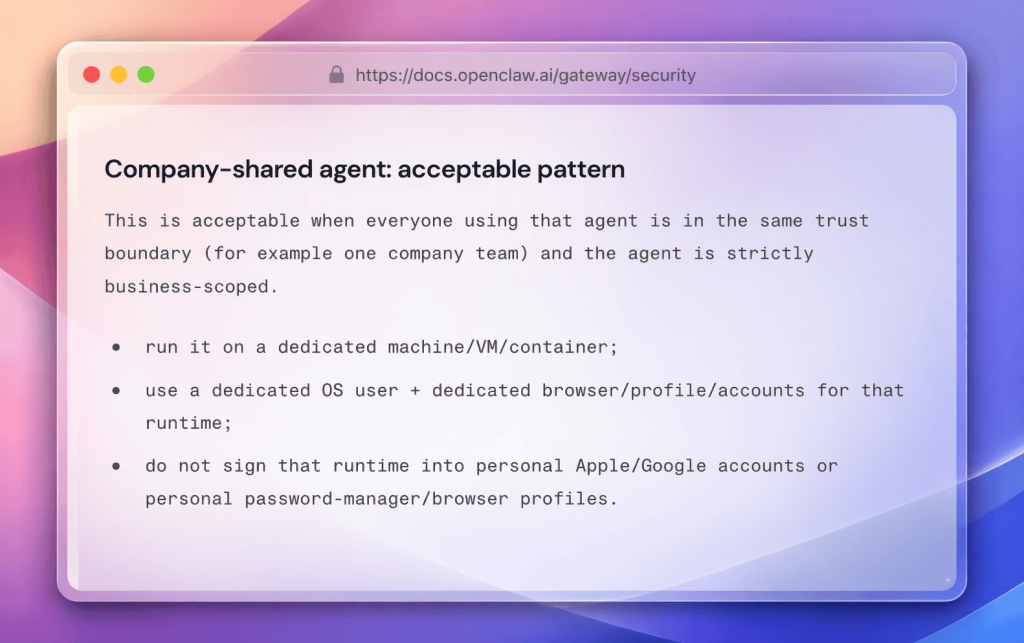
This is probably where you’ve started; you’ve followed the open claw guide; installed it locally, and started tinkering. If you’ve followed up until this point, you now have an LLM with user-level access to all of your files, apps, local secrets, web-browser sessions and more. This is pretty harmless up until this point, but once you start prompting, this could be a stability and security nightmare. The agent has pretty much full read/write access to your system files.
Combine this with incorrect configuration, such as opening your OpenClaw Gateway (The “Central Nervous system of OpenClaw”) to the internet means that anyone could interact with your agent and asking it to do, pretty much anything, on your machine.
That’s what makes it so powerful, a oh so dangerous.
2. Cheap LLM’s can cause agentic run-away

There’s a growing variety of cheap, open-source language models hitting the market. For example, Qwen, and Deepseek which are available on Amazon’s BedRock (which is an easy way to try multiple models with just 1 API key). If you compare the per million token price, it’s easy to get lured into using the cheapest models.
But there’s a hidden risk most people overlook—agentic runaway.
If you’re building with autonomous agents, workflows, or tool-using systems, cheap LLMs can quietly turn into your most expensive mistake.
If you’re new to LLMs, tokens are the basic unit of text processing.
Roughly speaking:
- 1 token ≈ ¾ of a word
- 1,000 tokens ≈ ~750 words
Every interaction with a model—input and output—consumes tokens. Pricing is typically measured in cost per million tokens.
So when you see a model that’s 10x cheaper, it feels like a no-brainer.
The Trap: Cheap Models are not (yet) very good with OpenClaw.
Lower-cost models often come with trade-offs:
- Less reliable reasoning
- Poor instruction-following
- Higher hallucination rates
- Inconsistent stopping behavior
This becomes dangerous in agentic systems—where the model decides what to do next. Open Claw requires the LLM to be able to decide on what tools, subagents and actions it needs to do next. When a LLM doesn’t have the agentic training to make these decisions, instead the weaker models might:
- Loop unnecessarily
- Retry the same failed action
- Call tools repeatedly
- Generate excessive intermediate steps
This is what I call agentic runaway.
Additionally, Read/Write caching means you could end up using the same, extensive context, but only be charged for very little tokens. Normally, you pay for the same big chunk of context every single time you call the model.
With caching:
- You store that big chunk once
- Then only send the small, changing parts each time
Example:
You have a 2,000-token system prompt and make 50 calls.
Without caching:
You resend all 2,000 tokens every time → 100,000 tokens total
With caching:
You pay 2,000 tokens once
Then each call only sends ~200 new tokens
So total becomes:
2,000 + (200 × 50) = 12,000 tokens
That’s about 88% less.
3. Create Skills rather than using the Agent to figure it out
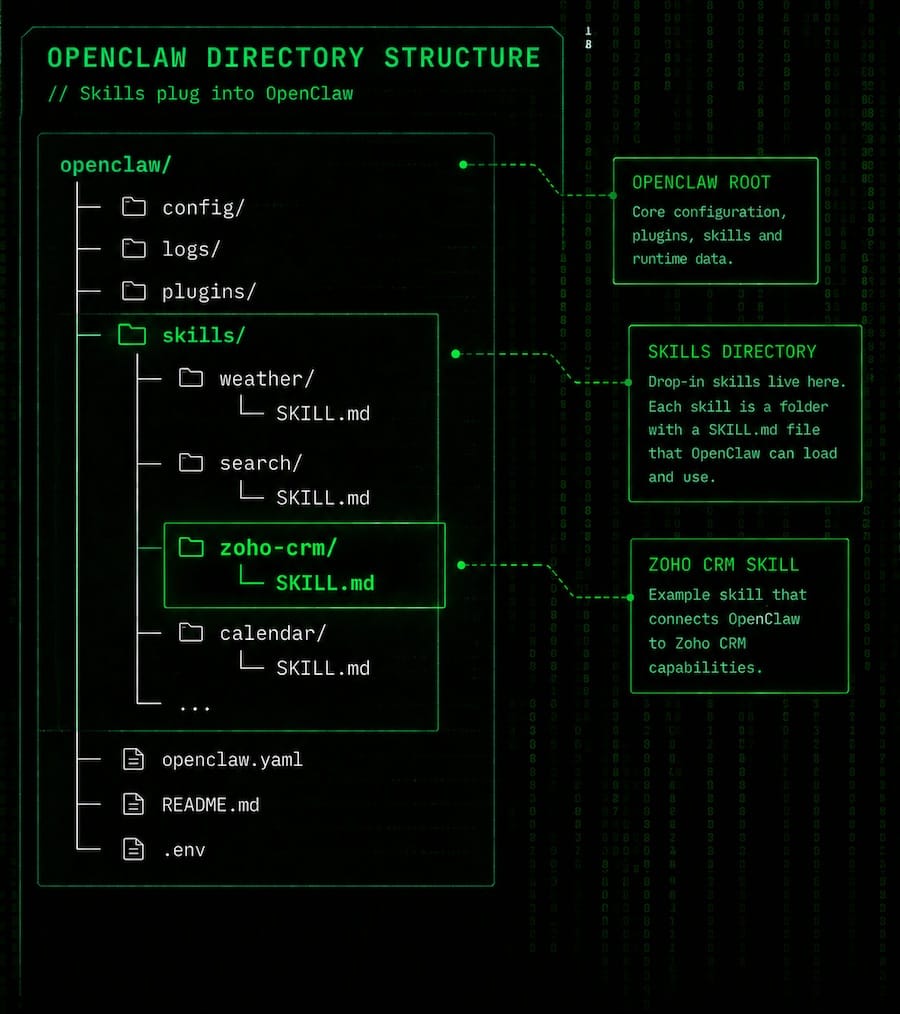
The beauty of OpenClaw is you don’t need to program anything; simply asking OpenClaw to connect to a system, authenticate, “figure it out” and save it to memory.
This is what makes the system so magical, but prone to burning tokens. Next time you call for the same action, this will require OpenClaw to repeatedly write the same tokens to the Model, again and again, for the same command. This ultimately causes a whole bunch of token burns for the same actions, while reducing reliability.
If you just ask an agent without a pre-defined skill to call a Software such as your CRM, for example, you’re relying on it to:
- remember the endpoint or research on the internet what to do to access the software’s API
- format the request correctly
- handle authentication, edge cases and failures.
That’s a lot of room for drift; where your LLM can hallucinate what actions it needs to do simply by your inputs. For example, if you don’t say “Authenticate to the CRM API”, and instead “Log into the CRM”, it could trigger the agent to launch a browser and log in using your credentials, significantly more token burn than just using a skilled API.
Whereas, skills encode that logic once, correctly, and reuse it every time. You get consistency instead of hoping the model reconstructs the call properly each time, and it’s easy to get Claude code or GPT Codex to build a skill based on your Software’s SaaS API documentation.
A skill wraps complexity behind a clean interface. Instead of:
“Call CRM X with params A, B, C, handle errors like Y…”
you get:
“Use
find_customer_accounts”
That simple command makes systems easier to scale, maintain, and compose. You essentially tell the Agent to just call the command and let the classic computer run a deterministic outcome.
Skills don’t just execute—they guide the model on when and why to use them. A well-designed SKILL.md includes:
- trigger conditions (eg: “When I mentioned CRM, use Salesforce CRM Skill, or Zoho’s CRM Skill)
- constraints (eg: “Ensure you run Auth flow before you run any API commands”)
- expected inputs and outputs
That helps the agent make smarter decisions, instead of blindly attempting API calls whenever it sees a related keyword.
Maintainability and evolution
If your API changes, updating: One skill definition → fixes everything – vs – every prompt / instruction that mentions that API → brittle and error-prone
Note: Ensure your SKILL.md is titled correctly, it must be SKILL (without S) and ending in .md (lower case is important here)
Final Thoughts
A well-executed OpenClaw AI agent setup for your business can save hours of manual work, improve customer experience, and increase efficiency across your operations.
But success depends on:
- Setting up on infrastructure thats secure and purpose built
- Using LLM Models that are fit for agentic purposes
- Leveling up with Skills
If you get these right, OpenClaw becomes a powerful asset—not just another tool.
Need Help With OpenClaw AI Agent Setup?
If you’d rather not deal with the complexity, working with a specialised OpenClaw AI agent setup service can help you:
- Get up and running faster
- Avoid costly mistakes
- Build high-performing AI workflows tailored to your business
Done right, AI agents don’t just automate tasks—they drive growth.